

Incoming invoices without retyping
Email → recognise invoice → AI/OCR → validate data → ERP → DMS
From email to posting, without manual steps
Any format, any source, any destination: ahabFlow receives CSV, XML and e-invoices from workstations, business applications, mailboxes and database servers, then transforms, validates and delivers the data to your ERP, DMS, database, file storage or email system. No new ERP. No coding required. Monitored by the Hub outside your network.
Less manual work. Fewer data-entry errors. Greater visibility.
Connect your systems through their existing interfaces.
We assess integration with your specific application based on its interfaces, access permissions and vendor terms. Ready-made connectors are only promised where they are available for your system.
A closer look at two processes: from a database view to a ZUGFeRD invoice, email delivery and archiving; and from XML plus PDF, enriched with database values, to your archive system. Both are monitored throughout.
A schedule or database event triggers the process. The Worker reads the view, creates a valid ZUGFeRD invoice from it (structured XML plus PDF/A-3), validates the schema and required fields, emails it to the recipient and stores the indexed document in the archive.
Monitoring checks run alongside the workflow: run time, validation results, SMTP acknowledgement and archive ID are logged. If a step fails, it is retried or escalated, not silently skipped.
In the second process, the Worker monitors an incoming folder. Each item consists of an XML file and its associated PDF. Content is read from the XML, not the PDF, and enriched with additional database values.
The document and its metadata are then sent to the archive system. Only after acknowledgement are the files moved to the backup folder. Every step is timestamped, helping to prevent duplicates and unnoticed backlogs.
ahabFlow monitors systems and workflows and responds according to your rules, before someone has to call.
The Worker checks the service at configured intervals. A rule approved in advance can attempt a restart, check the result and notify the relevant contacts. Appropriate permissions are required, and all attempts are logged.
If the service remains down after the attempts, the Worker collects log files and system context and emails them to the responsible external service provider. You receive an update at the same time, so everyone has the same information.
Monitoring checks available today
Actions a workflow can trigger
The catalogue grows with your needs. Need a check or action that is not listed? We can develop it on request. You are not limited to what is available today.
Six typical processes from projects with medium-sized businesses, IT service providers and public-sector organisations.
Email → recognise invoice → AI/OCR → validate data → ERP → DMS
From email to posting, without manual steps
Monitor folder → classify → add metadata → import into DMS → clear source
No more folders waiting to be processed
Read query → transform → match document → import → write back status
The document and its data, together again
Detect file → read → generate JSON → call interface → log result
Setup scope agreed after an interface review
Check SFTP → retrieve files → process → deliver to target → archive successful files
Traceable, even months later
Check system & service → detect fault → run approved response → check result and escalate if needed
Get alerts from your systems, not your users
ahabFlow creates XRechnung or ZUGFeRD invoices from structured sources such as CSV files, database views, JSON or API responses. It reads the data, completes and checks required fields, generates the XML and sends it with the PDF/A-3 to the recipient through the customer's email system. The document and metadata are then archived.
Receive e-invoices, extract their structured data and deliver it to the right system.
Generate the required format from structured invoice data and send it after the defined checks.
Mandatory e-invoice issuance for almost all businesses, regardless of size.
Archive sent invoices and retain the supporting records.
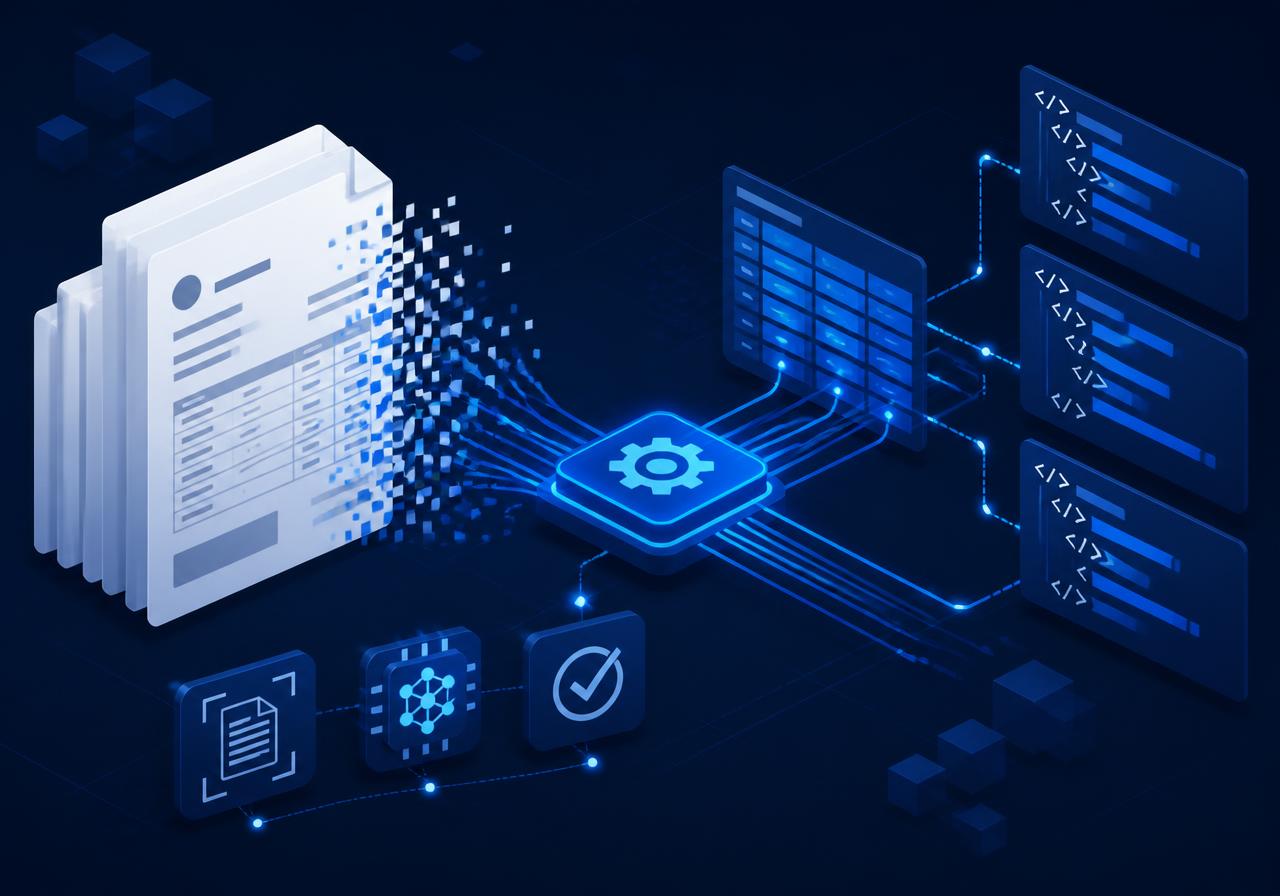
Invoices with structured data (XRechnung, ZUGFeRD) arrive by email, portal or file storage. The format and content are recognised, required fields are checked, and structured data is passed to the ERP. The file is renamed (for example: Supplier_InvoiceNumber_Date.pdf) and stored in a file system or an audit-ready DMS archive.
Processes built up over the years keep the business running - until one fails, an employee leaves or a new requirement arrives.
“A script has handled that for years. The person who wrote it left long ago.”
“We only noticed when Accounts complained.”
“Export, check, rename, upload. Every morning.”
One platform instead of a collection of standalone tools that only one person understands.
Build each process from reusable components: visible, version-controlled and maintainable without coding.
Run times, errors and failed systems in one interface. Notifications and escalations follow your configured rules.
Convert between XML, JSON, CSV, databases and e-invoices. Rename, calculate, filter and validate fields.
SQL Server, PostgreSQL and MySQL through queries or procedures. Connect modern systems using REST, HTTP and JSON.
Monitor folders, transfer files, classify PDFs and TIFFs, extract metadata and archive documents.
Process incoming emails, retrieve attachments and send status updates and approval requests automatically.
Use it where fixed rules are not enough: recognise document types, extract suppliers and amounts, interpret free text and match data. The results then continue through your defined validation rules.
Please note: You can connect your own AI models to a workflow or add optional AI processing billed by page volume. With external AI services, the processing location depends on the configuration and agreed terms.
Three components, two deployment options and two responsibility models: cloud or on-premises, each managed by us or administered and monitored by you.
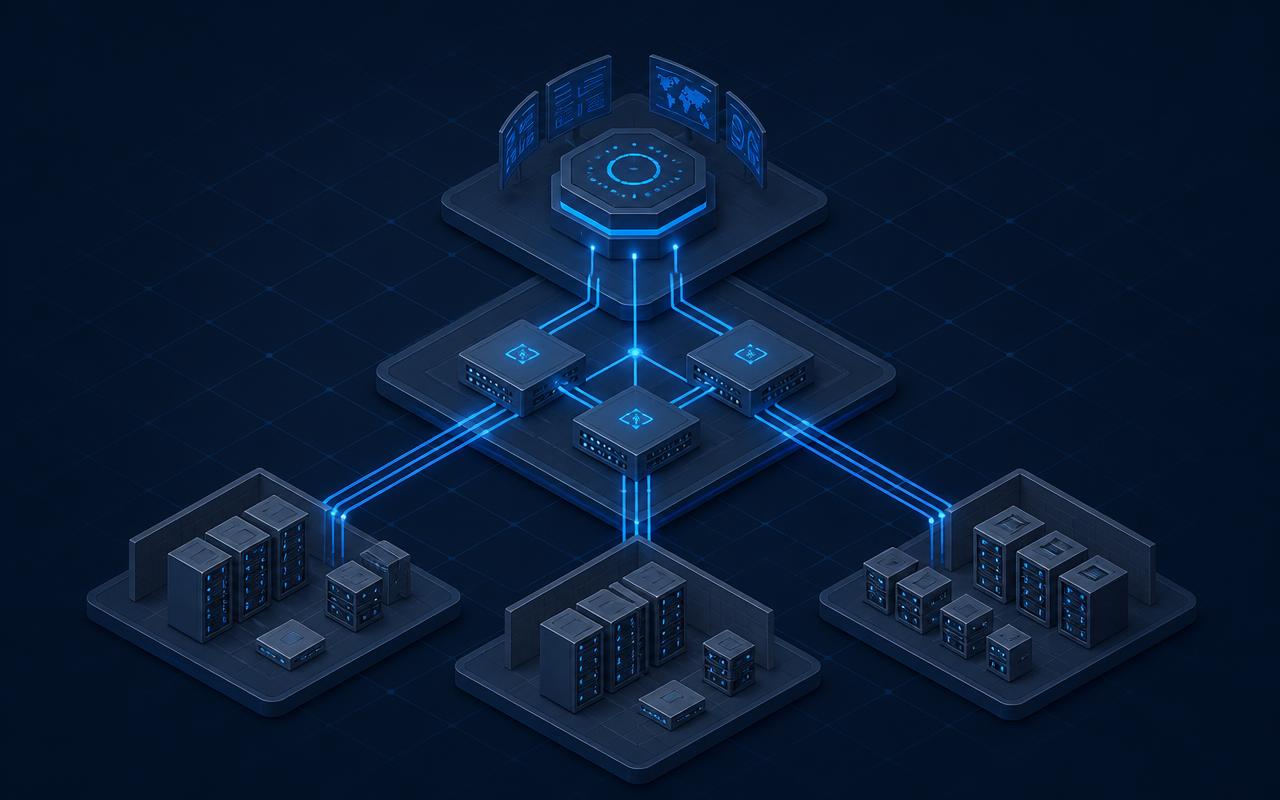
Each Worker is a complete execution node: it receives, transforms, validates and delivers data. It also monitors connected systems, services and processes through its monitoring checks. Processing runs directly on the server where the Worker is installed. Multiple Workers can run on a single server or across many servers.
Links the Workers in your environment to the Hub, distributes tasks, synchronises state and ensures each process runs in the right place.
The central administration component: design workflows, add monitoring checks and configure jobs, with monitoring, logs, roles and tenants in one place. Available in your environment or as a managed service.
There are no individual charges per document or processing step. Your plan includes an agreed monthly document volume. Volume extensions are available if you need more.
Clear plan sizes: 1, 5 or 20 automated processes. The cards compare workflow counts, included monitoring checks and monthly document volumes. During the process review, we identify the components, interfaces, deployment and permissions your process needs and specify them in the quotation.
Receive an invoice → validate its data → deliver it to the DMS: this can form one connected workflow. Repeated runs of the same configured workflow are not charged as individual transactions. The precise treatment of variants, tenants and destination systems is agreed in the quotation. Custom setup and external services, such as AI usage, are listed separately.
A technical retry does not count the same document again. Monitoring-only activity does not use your document allowance.
Updates and product support are included in the licence. You retain full control over Workers, workflows and monitoring.
The monthly equivalent applies with a 12-month minimum term and annual payment in advance.
A monitoring check tracks a service, port or incoming file, for example. Custom workflow setup starts at €249 as a one-off charge. Tiered terms are available for partners.
The plan cards show base prices for the included document volume. All prices exclude statutory VAT. Annual contract: 12-month minimum term, paid annually in advance. Flex contract: one-month minimum term, monthly billing and monthly cancellation. Setup is charged separately. Notice periods and renewal terms are specified in the quotation. This selection applies to Self-Service only, not Managed Monitoring.
ahabFlow automates work and monitors systems across internal tenants, such as companies in the same corporate group, company codes or ERP tenants. Additional tenants are available on eligible plans.
A technically identical workflow counts once, even when several tenants use their own settings. Separate automation processes count separately. The agreed monthly document allowance is shared by all tenants under the licence.
IT service providers and systems integrators need a separate customer licence or an individual partner agreement for independent customer businesses.
The quote sets a fixed document limit. If you need more, we agree the extension in advance. See the licence terms for the document allowance and the terms and conditions.
Each distinct business document or file that a workflow processes or creates counts as one document. Examples include an incoming PDF invoice or a newly generated e-invoice.
A multi-page document counts once. Converting, transferring or retrying the same document does not increase the count. Monitoring-only activity does not use the allowance.
Enter the total number of documents per month across all tenants.
If your volume falls between two tiers, the next tier applies.
AI prices depend on the model, region and monthly page volume. Each rate applies to the pages in its tier. Licence and billing terms.
Your recommendation
With Self-Service, you configure and run your monitoring. With Managed Monitoring, we carry out the agreed setup, maintain rules and review relevant alerts during the agreed service hours. Troubleshooting operating systems and business applications is not automatically included.
Managed Monitoring has a 12-month minimum term, regardless of the Self-Service contract option. Standard setup and rule configuration for the agreed scope are included. We agree on scope, existing infrastructure and any special requirements in advance. Custom workflows and further troubleshooting are quoted separately.
Managed plans include the stated standard workflows and checks for the agreed monitoring scope. Additional workflows for other business processes are licensed separately. Full service scope and exclusions.
Tell us about a process you currently handle manually or with your own scripts. We will explain how it could become an ahabFlow workflow, with no obligation.

Our email service has accepted your enquiry for sending. We normally respond with an initial assessment within one business day.
For any questions, contact us at info@ahab-it.de.
No. ahabFlow does not replace your ERP, DMS or business applications. It connects them and handles the transfers you currently carry out manually or through scripts.
Yes, provided there is an interface: a database, file storage, SFTP, email or an API. If a component is missing, we can develop it on request.
You can keep them. Existing logic can be integrated as a workflow step, with monitoring, logging and central management added.
No. Alongside managed deployment, ahabFlow supports operation in your own infrastructure, including central administration.
No. In addition to documents, ahabFlow processes structured data and monitors technical systems, services and interfaces.
Typical workflows start from a template. Custom workflow setup starts at EUR 249.